Get the apps
Apps › Windows › SoundCue
NewSee what's new in SoundCue
FreeVersion 0.3.7Windows 10 and 11, iPad and iPhoneComing soon

A fast multitrack audio editor written in Rust. Record, edit and mix audio with one-click AI voice enhancement and ready-made export presets for YouTube, Instagram, TikTok and more.

Windows 10 and 11, iPad and iPhone · Free, no ads, no tracking
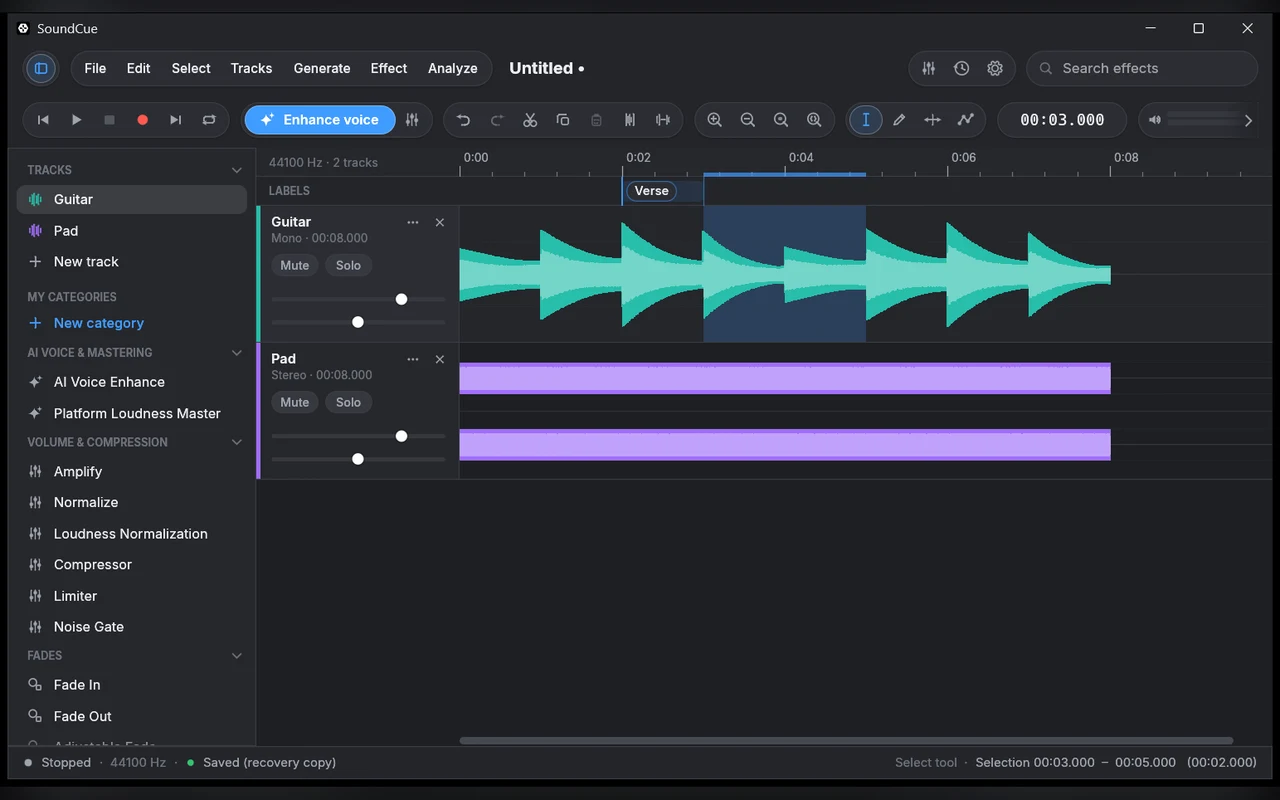
Editor

Two tracks, a pill toolbar and a sidebar of effects. Everything in one window.
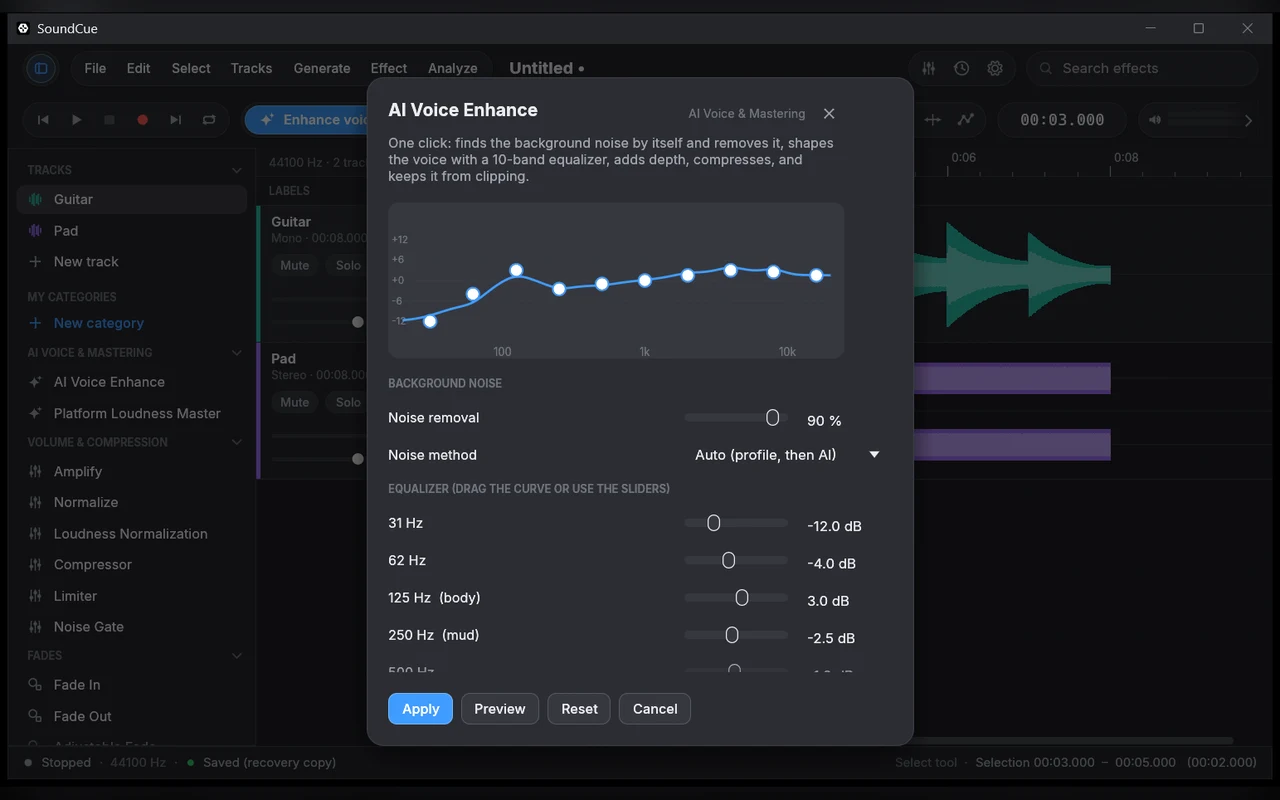
Voice

Press Enhance voice and tune every stage. One-click AI Voice Enhance.
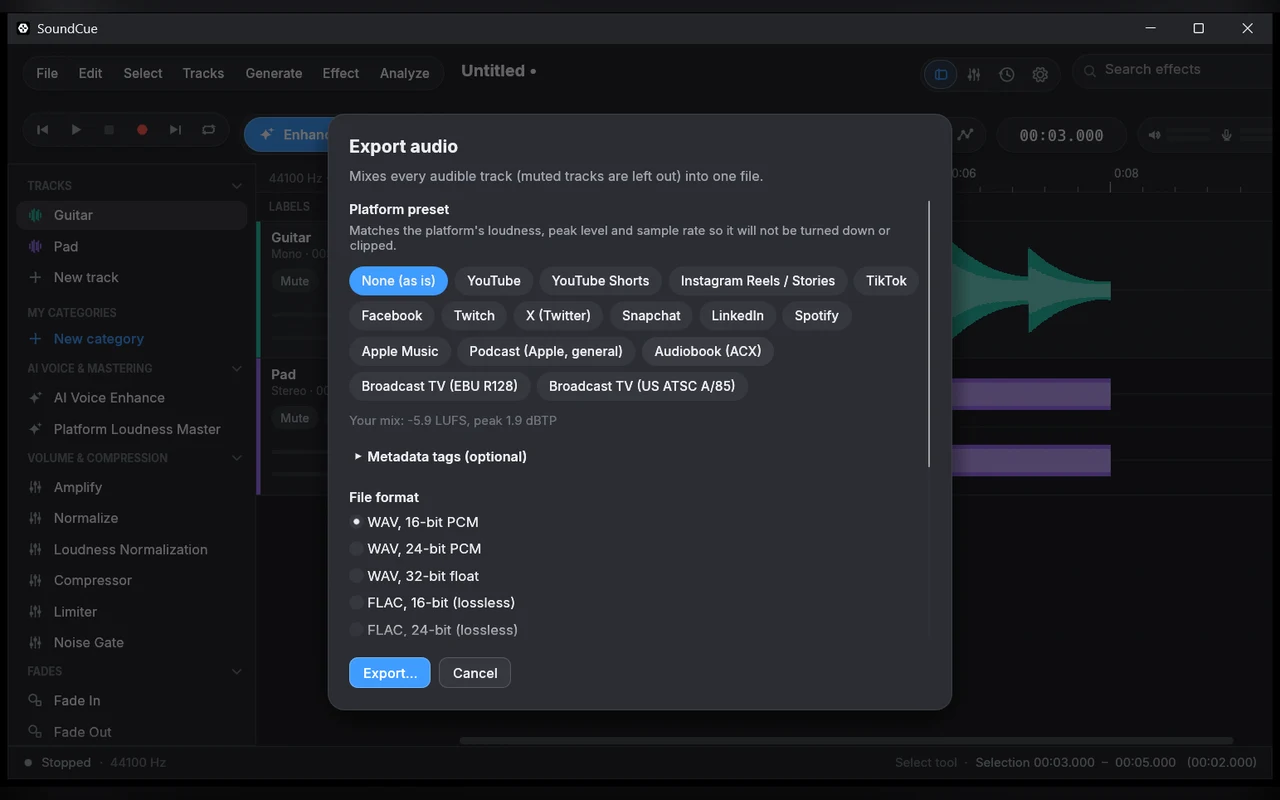
Export

Pick a platform and the loudness is set for you. Presets for every platform.
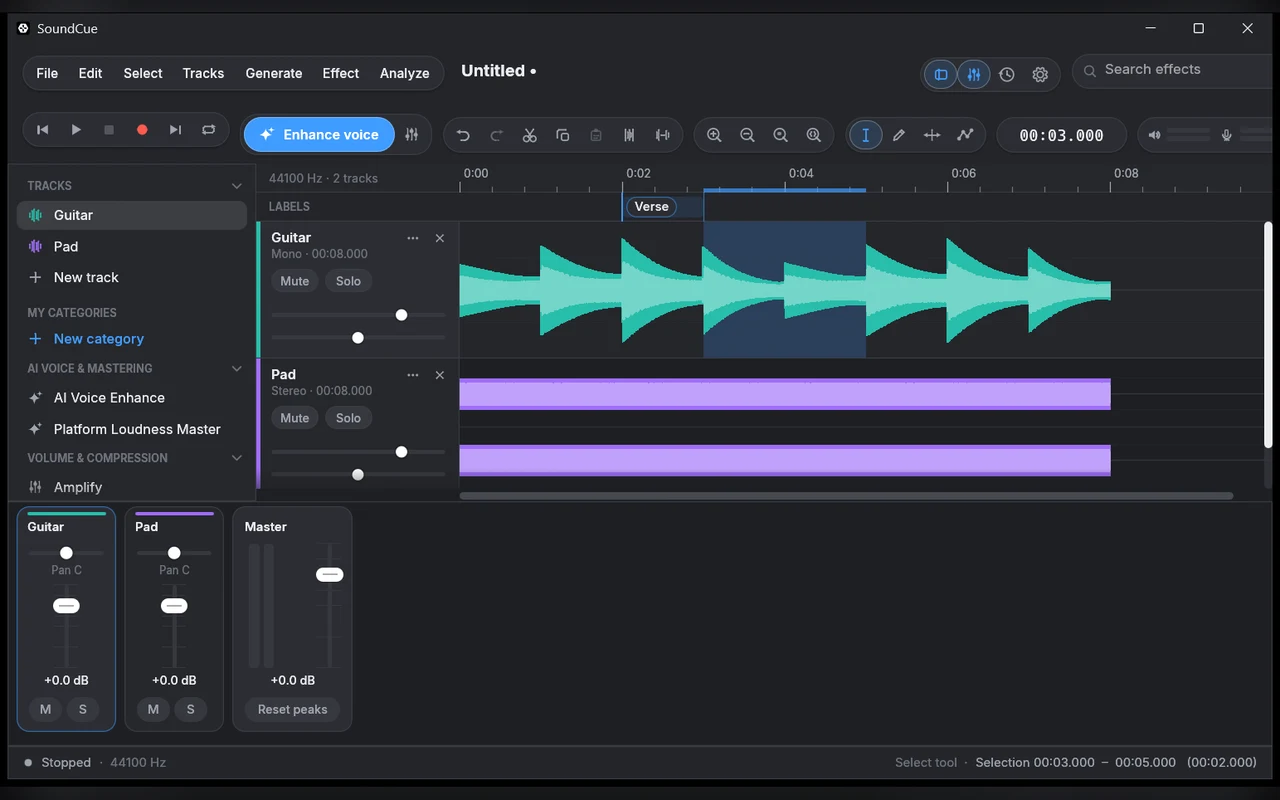
Mixer

Faders, pan, mute, solo and a master meter. A real mixer board.
Four things SoundCue does

Record, edit, mix and export.

VoiceOne-click AI Voice EnhanceFinds the background noise by itself, shapes the voice with a 10-band equalizer and never clips.
ExportPresets for every platformYouTube, Instagram, TikTok, Spotify, podcasts, audiobooks and broadcast TV set the loudness for you.
Effects41 effects and generatorsCompressor, limiter, EQ, reverb, noise reduction, pitch and tempo, and more.
SidebarYour own categoriesDrag any effect into categories you create, rename and reorder them.
Voice

One click for clean voice.

Press Enhance voice.

SoundCue finds the background noise from the quietest speech-free stretch of your clip, shapes the voice with a draggable 10-band equalizer, adds warmth and depth, de-esses, compresses and finishes with a limiter and true-peak safety.

  • Every stage has its controls next to the button
  • A draggable 10-band equalizer
  • Limiter and true-peak safety so it never clips
SoundCue AI Voice Enhance settings
Export

Loudness set for the platform.

Pick a platform.

SoundCue sets the loudness (LUFS), true-peak ceiling and sample rate for you. The dialog shows each platform's rules and what your mix measures now.

  • YouTube, Shorts, Instagram, TikTok, Facebook, Twitch, X, Snapchat, LinkedIn
  • Spotify, Apple Music, podcasts and audiobooks (ACX)
  • Broadcast TV (EBU R128, ATSC A/85)
SoundCue export presets
Spectrogram

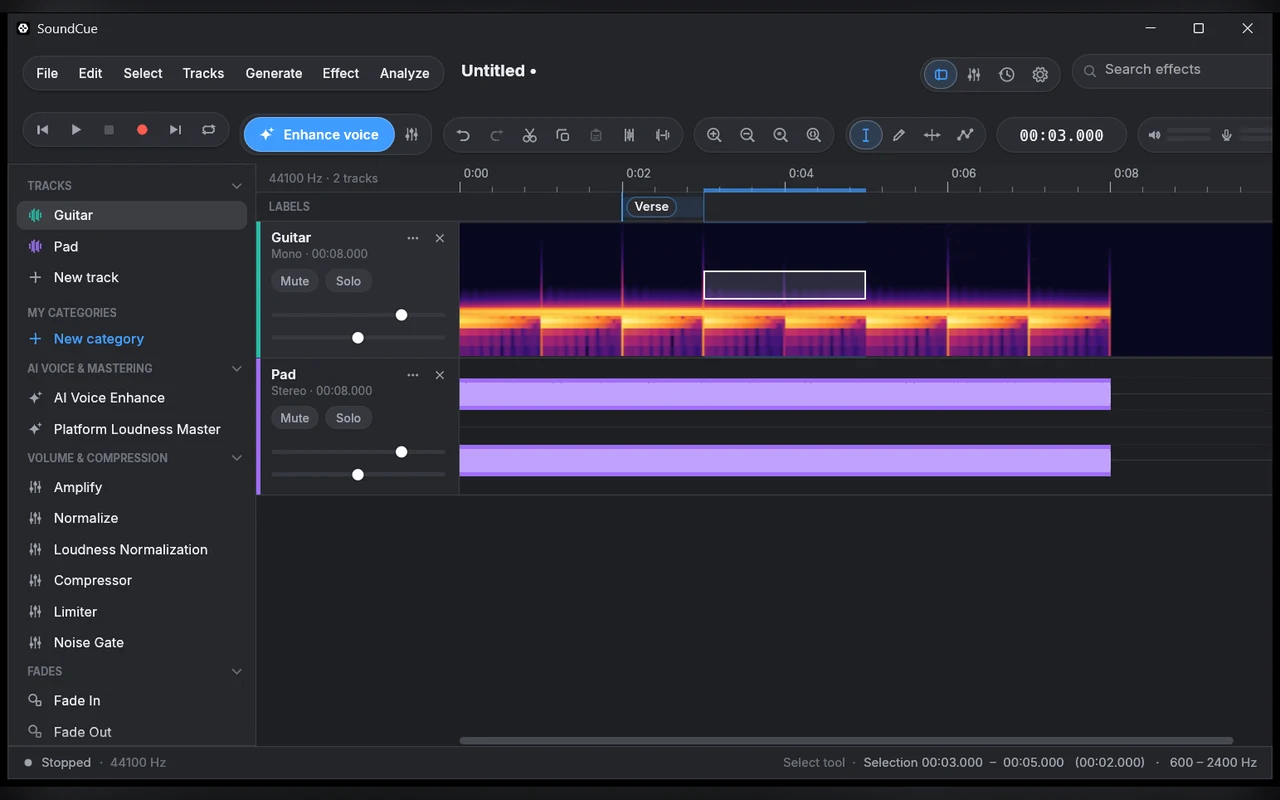
Select by time and frequency.

Spectrogram view.

Drag a box over time and frequency, then delete or keep that band.

  • Spectral selection
  • Spectrum plot, loudness and levels (peak, RMS, LUFS)
  • Find clipping and the Silence Finder
SoundCue spectrogram view
Mixer

Mix with faders.

Mixer board.

Faders, pan, mute and solo for each track, with a master meter.

  • Envelope tool to draw volume curves
  • Sync-lock keeps tracks aligned
  • Macros and batch processing for a whole folder
SoundCue mixer board

A closer look

Import

Bring in what you have.

AudioWAV, AIFF, FLAC, MP3, OGG, M4A/AAC, CAF
MIDIPlayed by a built-in synth
Other editors.aup3, .aup, .sesx, .rpp, .als, FCPXML, XML, EDL

Export

Save it the way you need.

WAV16, 24 or 32-bit
FLAC / AIFFSupported
MP3128, 192 or 320
OGG VorbisSupported

Free. No ads. No tracking.

SoundCue app icon
SoundCueAudio editor
Price
Free
Version
0.3.7
Runs on
Windows 10 and 11, iPad and iPhone
Licence
MIT
Free

No ads and no tracking.

Coming soon

What's new

Release notes for SoundCue.

Version 0.3.7 · Nov 21, 2026

Changed

  • iPad and iPhone toolbars match Windows. The pills, groups and spacing are the same full size as on Windows. Where the width is too small the rows scroll sideways (with arrows at the cut-off edge), on iPad and iPhone alike; nothing shrinks, collapses or hides. A row that fits spreads its pills so the last one ends at the same margin as the first starts. This replaces the shrink-to-fit steps of 0.3.6.
Version 0.3.6 · Nov 21, 2026

Fixed

  • Toolbar fits iPad and iPhone screens. On touch screens, when a row is too wide the pills shrink a step or two and tighten their gaps, then the Enhance voice pill becomes an icon, and the level meters step aside, before anything scrolls. A row that fits spreads its pills so the last one ends at the same margin as the first starts.
  • Phone held sideways: File to Analyze collapse into one Menu button, search is a round button that opens a search sheet, and the project name is dropped instead of showing as "Untit...".
Version 0.3.5 · Nov 21, 2026

Changed

  • AI Voice Enhance learns the noise from the silence before you start talking (up to 10 s at the start of the clip) and removes it as the first step, again after the EQ and compressor, and once more as the very last step after the loudness normalise. It uses a Wiener filter instead of the old threshold mask. Measured: pauses end up 35 to 80 dB lower for steady noise. Noise mixed with the words is only reduced by a few dB. See docs/noise-reduction-test.md.
  • New optional Use my silence sample switch (select a noise-only stretch, press Use Selection as Silence Sample) for clips that do not start with silence.

Added

  • Repeatable noise-reduction test (noise_eval example and scripts/make_eval_speech.sh).
Version 0.3.4 · Nov 21, 2026

Added

  • File > Import project from another editor… converts a project into a SoundCue project (tracks, clip positions and trims, gain, pan, mute, solo, markers) and shows what was and was not converted. Reads the project files of the common desktop editors and DAWs (.aup3, .aup, .sesx, .rpp, .als) and the interchange formats FCPXML, XML and EDL. Audio files are found next to the project or by name in its sub-folders. Each track's clips are merged into one track at their original positions.
Version 0.3.3 · Nov 21, 2026

Added

  • Home button (a movable toolbar icon) and a Home page: new project, open, import, and your recent files. The project you were editing stays open behind it (Continue editing).
  • New effects: Auto Duck (lowers music under a voice), Blend Tracks (crossfade two tracks), Smooth Join (removes the click at a splice), Curve EQ (12 points), Shelf Filter, Gliding Stretch (tempo and pitch that change gradually), Multi Delay (regular or bouncing), Glitch Repair, Voice Isolation, and a new Spectral category (Band Tool, Band EQ, Dual Shelves). Categories were renamed: Volume & Dynamics, Tone & Filters, Space & Delay, Colour & Modulation, Clean-up & Repair.
  • Back up and restore settings to one file (Settings > About), through the system file pickers, so it works on Windows, iPad and iPhone. Restoring keeps a copy of the previous settings.
  • The status bar shows Auto saving... while autosave writes, then All changes saved with the time, or Auto save off.

Changed

  • Upgrades never reset your settings. Settings load field by field (an unknown or damaged field falls back on its own), are versioned and migrated, are written safely, and an older file is copied to settings.v<N>.bak first.
  • Onboarding: buttons are the same size and in the same place on every page, spacing is even, the page scrolls inside the card instead of being cut off, and it fits a phone on its side.

Questions

Does an upgrade reset my settings?

No. Settings are kept in your user folder and loaded field by field, so new versions add options without resetting yours.

Can I rebind the keys?

Yes. Every command can have a key, and you can rebind them in Settings.

Which themes does it have?

12 dark themes, a light theme and 16 accent colours. Text size and animations are adjustable.

Record, edit and mix.

Free. No ads, no tracking.

Coming soonSee all apps